

Workspaces and teams
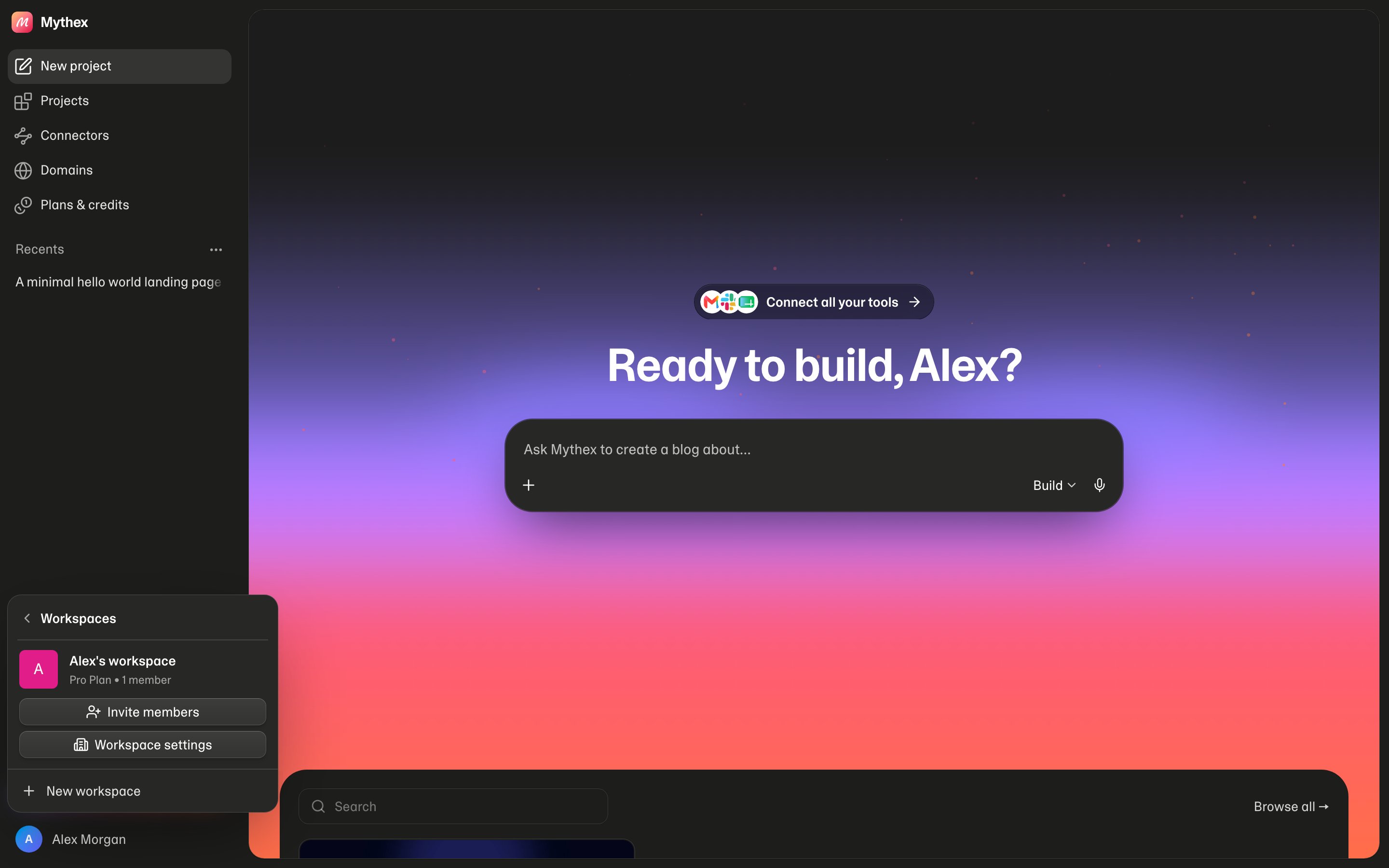
Collaboration in Mythex is workspace-based. Projects live in a workspace; its members open and build on them according to their role. Where things are. The Team page (/settings/team): your avatar at the bottom of the sidebar → the top row (you and your workspace) → Workspace settings. Then:
Who pays, and whose plan counts
A workspace’s projects belong to its owner:- Credits — everything spent in the workspace (the agent, the workspace sandbox, published apps) comes out of the owner’s balance.
- Plan — the owner’s plan decides which team controls the workspace has. A Business owner’s workspace has Business controls for every member, whatever their own plan; the same goes for Enterprise.
Your personal workspace
When you sign up, Mythex creates a personal workspace for you. Most solo builders stay on it. It can’t be transferred, left or deleted.Create or switch
- Click your avatar at the bottom of the sidebar, then the top row of the menu (you and your workspace). The workspace menu slides in; ‹ Workspaces goes back
- Pick another workspace to switch, or choose New workspace and give it a name
The Team page
Each workspace has a Team page (/settings/team). Open it from the workspace menu (Workspace settings or Invite members), or from Account settings → Team → Manage. If you’re in more than one workspace, pick which one at the top right.
Tabs a workspace’s plan doesn’t include show a lightning mark and explain what they do and which plan (Business or Enterprise) adds them.
When something is waiting for an admin (a join request or a publish to approve), the workspace menu shows it with a Review button.
Roles
- Free and Pro workspaces have the Owner and Editors. Admin and Viewer come with Business.
- Only the owner can make someone an Admin, change an Admin’s role, or remove an Admin.
- The owner’s role can’t change. To hand the workspace over, transfer ownership.
People
People lists everyone in the workspace with their role, when they joined, their credits this month and in total, and their monthly credit limit. Admins see everyone’s numbers; other members see only their own. Click a person to open their details: credits this month (against their limit), the last 30 days, projects they made here, when they last spent credits, a chart of credits by day, credits by project, and the list of projects they made. Admins can open anyone; members can open themselves. Admins also get:- Invitations — pending email invitations, with Revoke
- Requests — people asking to join through your company email domain (Business), with Approve or Decline
Per-member credit limits (Business and up)
An Admin can give each member a monthly credit limit: the most they can spend in this workspace each calendar month (UTC). On People, click Set limit in the member’s Credit limit column. Remove limit takes it off. When a member reaches their limit, the agent stops for them with a message to ask an admin to raise it. The owner has no limit — it’s their balance. Default monthly member credit limit (Team → Workspace → Member defaults) is the limit new members start with, whichever way they join. Empty means no limit.Joining by company email domain (Business)
On Business, a workspace can claim your company’s email domain (for exampleacme.com) in Identity → Company domain:
- Your own verified email must be at that domain.
- Public mail domains (Gmail, Outlook, iCloud, Yahoo, QQ, GMX and others) aren’t allowed.
Approved people join as Editors. The requester gets an email either way.
Workspace tab
- Avatar — upload a JPEG, PNG, WebP or GIF (max 2 MB), or remove it. Admins.
- Name — up to 60 characters, as members see it. Admins.
- Workspace ID — click to copy. Useful when you contact support.
- Default monthly member credit limit — see above.
Transfer, leave, delete
- Transfer ownership (owner): hand the workspace to an Admin. They become the owner, its projects bill to them and follow their plan, and you stay as an Admin. Only they can undo it. Make someone an Admin first. If their plan is smaller than yours (for example, they’re on Business and the workspace uses Enterprise), Mythex shows what would stop working first — Require SSO or two-factor, the publishing rule, members-only apps, private projects, letting Editors invite (only admins can invite again), sharing controls (preview links and code downloads turn back on for everyone), member limits, the published-app limit — and asks you to confirm with Transfer anyway.
- Leave workspace (everyone but the owner): you lose access to its projects. An admin can invite you back.
- Delete workspace (owner): type the workspace’s name to confirm. Members lose access right away. Published apps keep running until the workspace is deleted for good.
When the plan goes down
When the owner moves to a smaller plan, cancels, or a trial ends without payment, the workspace keeps working. Nothing is deleted.- Members stay, with their roles. They keep building on the owner’s credits; when those run out they see “This workspace is out of credits. Ask the workspace owner to add credits or upgrade.”
- Settings above the new plan stop applying: Require SSO and SSO sign-in, required two-factor sign-in, the publishing rule (approvals), letting Editors invite, sharing controls, joining by company domain, and below Business, per-member credit limits. The Privacy & security tab shows them locked, with the value that applies now.
- Members-only apps stay members-only, also when they’re published again. Only an admin choosing Anyone with the link opens one. No new app can be made members-only.
- Private projects stay private. Their creator or an admin can still open them to everyone or share them; no new project can be made private.
- Published apps stay up. On Free, an account over the 3-app limit keeps its apps but can’t publish a new one until it’s under the limit, and Free apps show the “Built with Mythex” badge.
- Upgrading again brings every setting back as it was.
Restore a deleted workspace
A deleted workspace can be restored for 60 days. Its owner sees it under Recently deleted on the Workspace tab, with the date it can be restored until; click Restore. After 60 days the workspace, its projects and their published apps, databases and files are removed for good.Privacy & security tab
Admins set these for the whole workspace. Rows marked Business are locked below Business; rows marked Enterprise are locked below Enterprise.
Publishing rules and approvals (Enterprise) and members-only apps (Business) are explained in Who can publish and open apps.
Private projects (Business)
A project’s creator, or an Admin, can make a project private from the project’s Settings → General → Who can see this project. A private project is visible to its creator, Admins and the owner, and to Editors or Viewers it’s shared with (Share with a member…). Removing someone from the workspace also removes what was shared with them.Identity tab (Business)
- Company domain — see Joining by company email domain.
- Single sign-on (SSO) — members sign in with their company account. See Security → SSO.
Audit log (Enterprise)
Audit log shows who did what in the workspace, newest first, 50 at a time (Load more for older ones). Admins and the owner can read it. It records:- Workspace — created, rules changed, ownership transferred, deleted, restored
- Members — invited, invitation revoked, invite link created or revoked, asked to join, join request approved or declined, joined, left, removed, role changed, spending limit changed
- Projects — published, unpublished, deleted, who can see it changed, shared or unshared with a member
- Publishing — asked to publish, publish approved or declined
- Secrets and data — secrets changed, a database login viewed
- Domains — added, removed
- SSO — setup started, turned off, someone signed in with SSO
Filter the log
Above the list:- Filter by action — one kind of event, or All actions
- Filter by person — who did it, or All people
- Time range — Last 7 days, Last 30 days, Last 90 days (the default), This month, Last month or All time
- Search projects and people… — events that affected a project or person whose name (or a person’s email) matches
Event details
Click an event to expand it:- When — the exact date and time
- Who — the person and their email, with Only this person to filter the log to them
- Affected — the project (a link to open it) or person it changed
- The event’s details, when it has any
Tips
- Use a separate workspace when a client or team should not see your personal projects
- Give people the lowest role they need — Viewers for stakeholders who only look
- Set a default member credit limit before you invite a large team