

Manage billing
Plans & credit usage
Open Plans & credit usage in the app (/billing):
- See your current plan and daily credits remaining
- Preview usage (last 30 days) — or open full Usage details
- Upgrade, pick a credit tier, switch monthly / yearly, or Add credits
In-app Upgrade modal
When you run out of credits or hit a paid-only action, Mythex can open an Upgrade overlay instead of sending you to/billing first. Escape or click the backdrop to close. The CTA starts monthly Stripe checkout, where Stripe can offer a switch to yearly billing before you pay. Choosing yearly up front, and credit packs, are on /billing. Opening a project with ?upgrade=credits shows the credits variant.
After Stripe, you return to the app with a short success celebration, then keep building.
Upgrade to Pro, Business or Enterprise
- Go to
/billing→ Change your plan - Pick Monthly or Yearly (yearly is 2 months free)
- On the Pro, Business or Enterprise card, choose how many credits a month you want (100 to 10,000; Enterprise starts at 800). The price updates with the tier — see Credit tiers and prices
- Click Upgrade to Pro, Upgrade to Business or Upgrade to Enterprise and complete Stripe checkout. If you picked monthly, Checkout can still offer a switch to yearly for the same tier
Buy credits
Paid plans (Pro, Business and Enterprise): on/billing → Add credits, packs of 50 credits for $15 (up to 20 packs per purchase). Credits are valid for 12 months.
Free accounts cannot top up — upgrade first.
Outside the subscription, Stripe also bills domain registration and its yearly renewal separately (see Renewal).
Auto-reload
Pro, Business and Enterprise. Buys credits for you when your balance runs low, so a long build or a busy published app doesn’t stop at zero.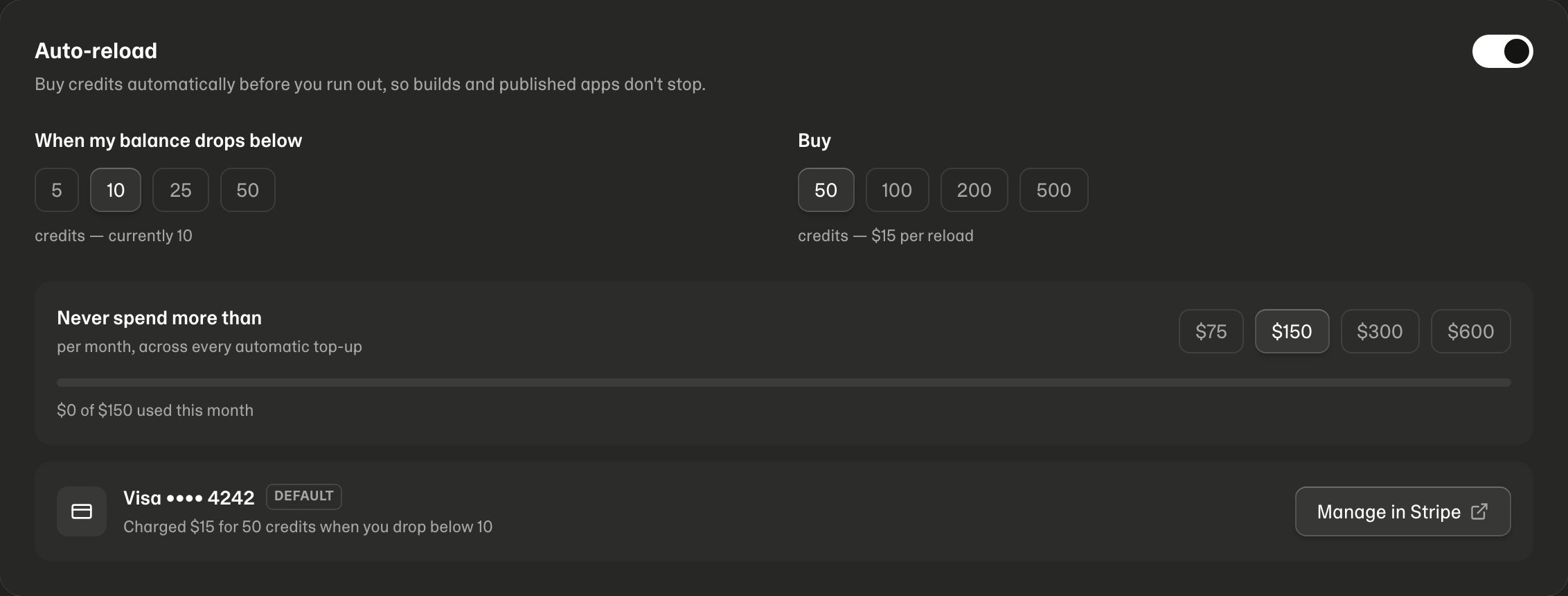
/billing → Auto-reload:
- Switch it on. It charges whatever payment method is marked default in Stripe — the same one paying for your subscription. There is no second card to enter.
- Pick the balance that triggers a reload (5, 10, 25 or 50 credits) and how much to buy each time (50 to 500 credits, $15 per 50).
- Set the monthly limit — the most auto-reload may spend in a calendar month, across every top-up. The default is $150.
Payment methods
Manage in Stripe opens the Stripe customer portal, where you can add a card, remove one, or mark a different one as default. Auto-reload always charges whichever is default, and follows a change the next time you open/billing.
Stripe handles the rules there too — it won’t let you delete the card an active
subscription depends on.
The limits
- Auto-reload never spends more than your monthly limit. Once that is reached it stops until the next month, and we email you.
- If the limit leaves room for less than you asked for, it buys what fits rather than nothing.
- Only one reload can run at a time, and never two within two minutes — however fast credits are being spent.
- We email you every time auto-reload charges your card.
When it switches itself off
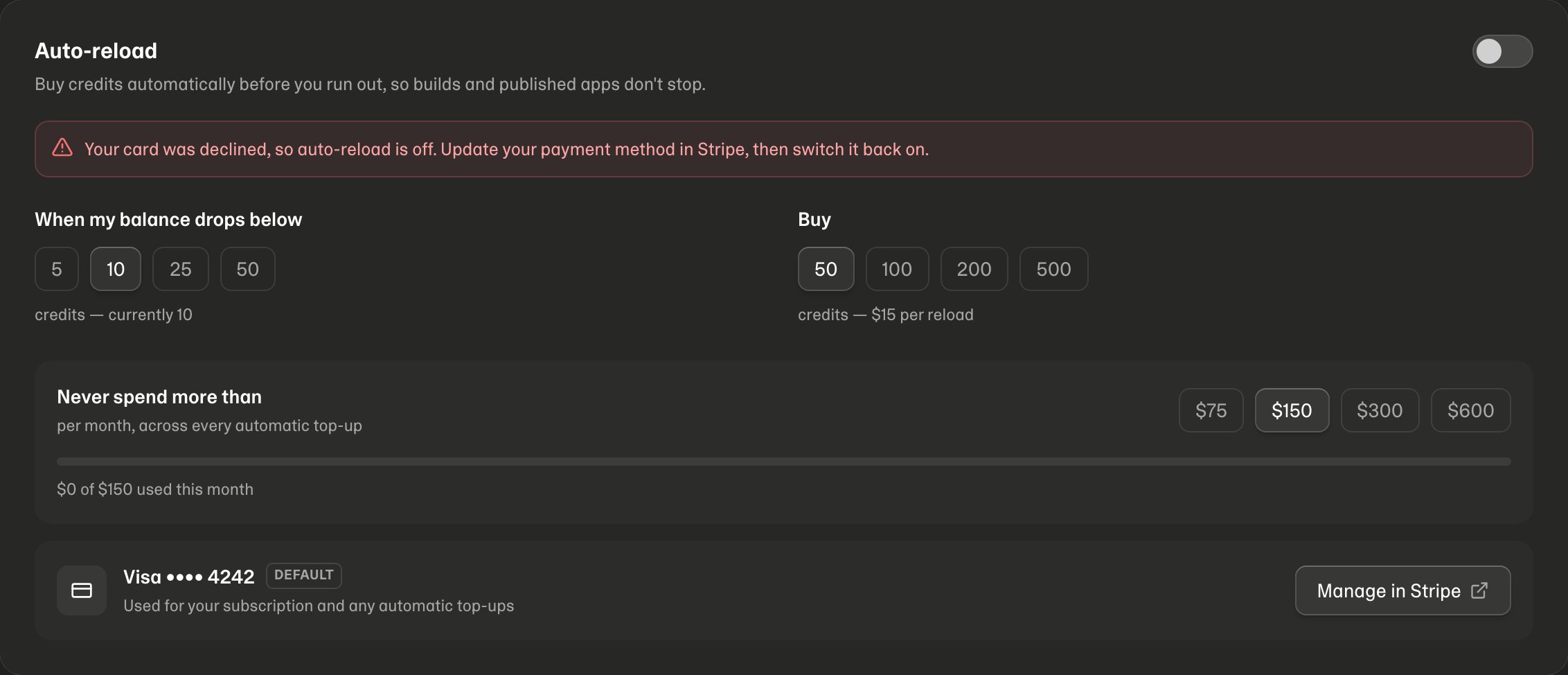
/billing, and emails you when:
- your card is declined
- your bank wants you to confirm the payment — which can’t be done while you are away
- there is no payment method left on the account
Cancel or change plan
Change plan or tier
While subscribed, pick another tier or plan on/billing → Change your plan and click Switch to this plan. Mythex shows what happens before you confirm:
- Moving up — you pay the difference for the rest of the billing period now, and the extra credits arrive right away.
- Moving down — no refund; you keep this period’s credits, and the new price and credits start at your next renewal.
Cancel
- Open
/billingwhile on a paid plan - Click Manage subscription (or Manage / resume if you already canceled)
- In the Stripe portal, cancel (or resume), update your card, or download invoices
- Paid plan — leftover credits stay. Paid features lock, including team controls in workspaces you own.
- Unpaid trial — unused trial credits (the Pro grant you did not spend) are removed when the trial ends. Credits you already used stay used. Any Free leftover from before the trial stays.
Enterprise
Enterprise is self-serve: pick a tier on the Enterprise card (from 800 credits a month) and click Upgrade to Enterprise, as in Upgrade. To talk to us first, click Book a demo on the same card: it opens a short form (mythex.ai/enterprise/demo) that asks for your name, work email (personal addresses are refused), company website and, optionally, phone and what you want to solve. We reply by email within one business day. Use it too for what comes with a custom contract, such as invoice billing and Okta, Microsoft Entra or SAML sign-in. See Plans → Enterprise.In the Mythex iPhone and Android apps
The same Plans & credits page is in the apps, but plans and credit packs are bought through Apple (App Store) or Google (Google Play), paid with the card on your Apple or Google account.- Prices are Apple’s and Google’s, shown in your App Store or Google Play country’s currency. They match the website’s US dollar prices.
- What’s sold: Pro, Business and Enterprise, monthly or yearly, up to $999.99 — the most either store allows. Bigger tiers and yearly Enterprise are on the website, or use Book a demo. Credit packs of 50, 100 and 200 credits.
- Changing plan works as on the website: moving up starts now and charges the difference, moving down starts at your next renewal.
- Manage or cancel with Manage in App Store / Manage in Google Play on the page, or in your phone’s subscription settings. You keep the plan until the end of the period.
- Refunds for app purchases are handled by Apple or Google, not Mythex: reportaproblem.apple.com or Google Play’s order history. A refunded payment ends the plan and takes back the credits it bought that are still unused.
- Restore purchases (under the plans) brings a plan bought in the app back to your account, for example after reinstalling.
Domains (Pro and up)
Custom domains are managed at Domains (/settings/domains) — buy, connect, Configure DNS/WHOIS, transfer-out. See Custom domains.